If you find yourself wondering how to view who you follow on Amazon, then you’re in good company. At some point, this easy task was easy—but Amazon has modified its layout over time, and now tracking down the list of creators, brands and storefronts that you follow feels like a mini-treasure hunt.
In this article we’ll walk you through the quickest, easiest paths, both on desktop and mobile—so you regain full visibility of your “Following” list.
Table of Contents
Why Checking Your Follow List Matters
Before we dive into the steps, let us quickly take a look at why you’d ever want to see who you follow in the first place.
- Following creators, brands or influencers on Amazon will get you to frequently view (or be able to view) their curated storefronts, live streams, suggested items, and updates. So if you know who you follow, you can maintain control of your feed and recommendations.
- Occasionally you’ve followed someone a while back (perhaps an influencer whose specialization you were into at the time), but their suggestions don’t really interest you anymore. Reviewing and trimming your list keeps your Amazon experience customized for you.
- In rare cases you might follow a brand or creator unknowingly (or forget you did)—and that can affect what deals you see or what notifications pop up. So seeing your list means you stay in the driver’s seat.
What Happens When You Follow Someone on Amazon
It helps to understand exactly what following someone means on Amazon. According to Amazon’s own help pages:
- When you follow a creator, brand or storefront, that follow may appear publicly on “Your Follow Updates” unless you choose to hide it.
- You can manage your follows via your Profile page.
- However, Amazon doesn’t always push off big “push notifications” like social media; following is more about personalizing your shopping feed and less about social-media style notifications.
So in short: following is low-key, but it does affect your Amazon experience.
How to See Who You Follow on Amazon – Desktop Version
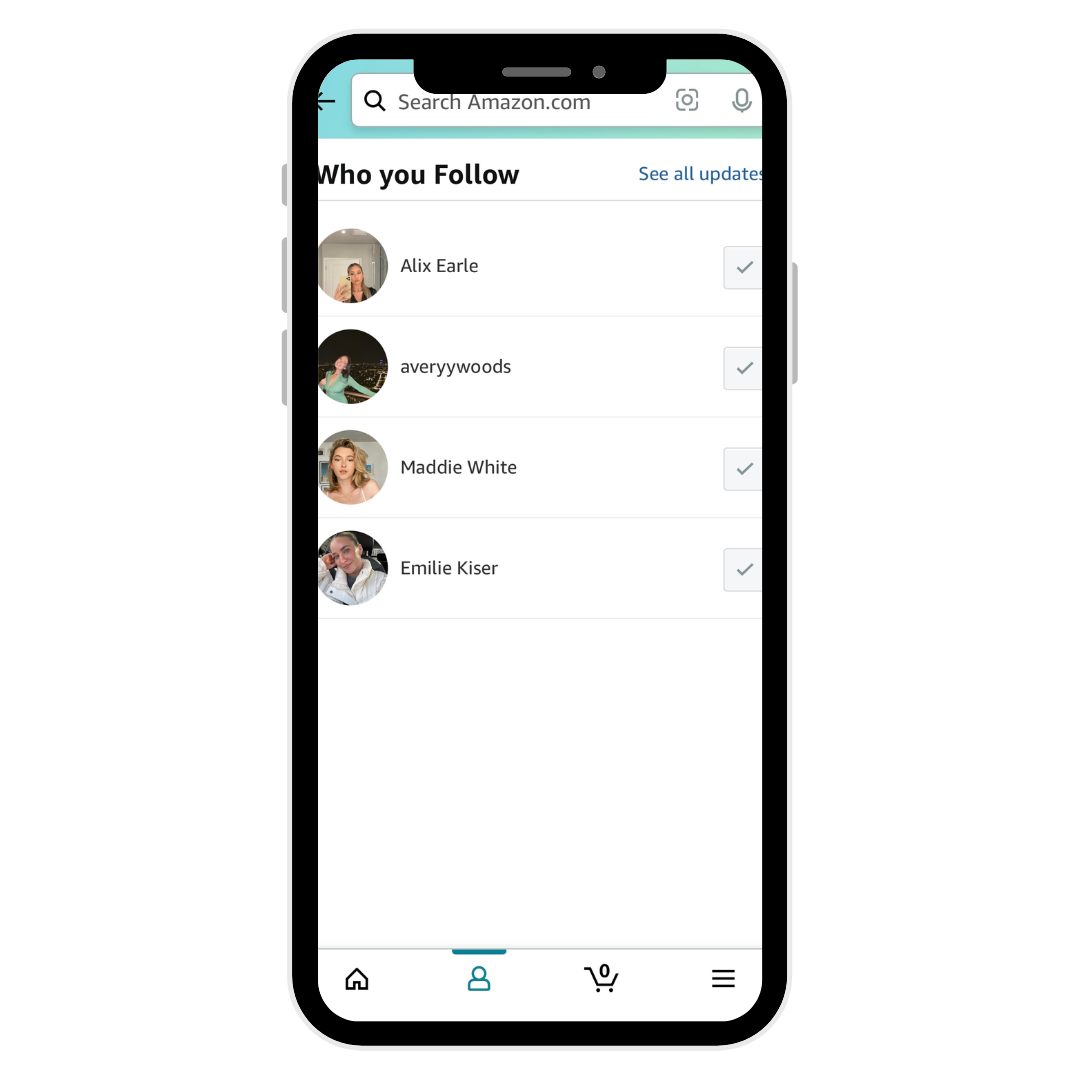
If you’re at your computer and prefer using Amazon via browser, here’s how you can find out who you follow:
- Log into your Amazon account.
- Because the usual “Your Profile” → “Following” link has been removed in many cases, your best approach is to paste or click this direct link (while logged in):
- Once the page loads, you should see a list of all the creators, brands or storefronts you currently follow. From here you can click through to their pages, or choose to unfollow if you want.
- If you also want to see “live” content from the folks you follow (for example live-streams or event content), you can go to:
https://www.amazon.com/live/following influencer-hero.com
Pro Tip: Bookmark that “/gp/profile/follow/recommendations” link so you can check your follow list anytime without having to dig through menus.
Amazon FBA vs. Dropshipping in 2024 – Which is Better?
How to See Who You Follow on Amazon – Mobile App Version
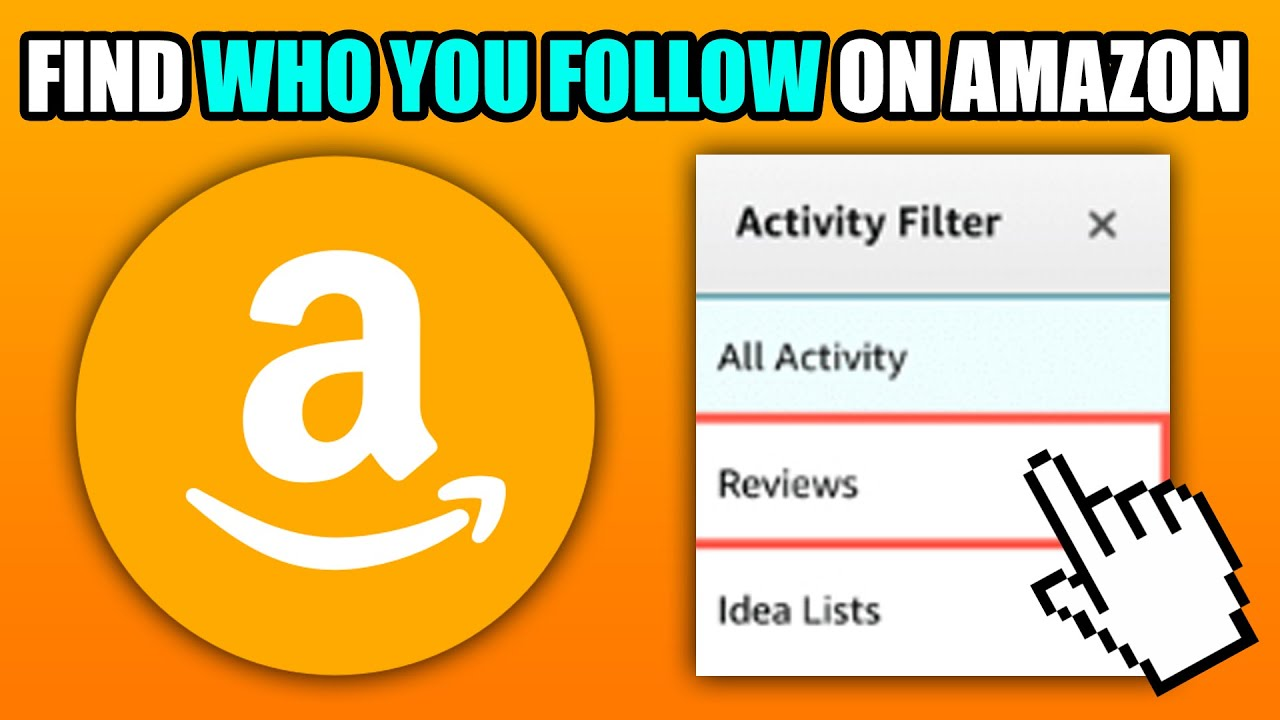
If you’re using the Amazon Shopping app on your phone or tablet, the steps are just as important, and slightly different.
- Open the Amazon Shopping app (make sure you’re logged in).
- Look at the bottom of the screen and tap on the person icon (the profile icon, usually the third from left).
- On your profile page, scroll down to the very end until you see a part labeled “Following”, or something almost exactly like that. Press “See more updates” if you have it.
- You’ll then reach the list of accounts you are following. You can review, click through, or unfollow directly from here.
If you don’t see a clearly mentioned “Following” section, it might mean Amazon has slightly altered the layout for your region or app version, please scroll thoroughly or check under “Your Shopping Preferences.”
What to Do If You Don’t See the Following List
Because Amazon occasionally changes its interface, you might run into situations where you don’t see the “Following” list in the usual places. Here are a few troubleshooting tips:
- Ensure you are logged in to the correct account (sometimes users have multiple Amazon accounts and the list is under a different one).
- On desktop, try clearing your browser cache or using a different browser—sometimes the direct link may fail due to caching.
- On mobile, make sure the Amazon Shopping app is updated to the latest version. If not, update it and re-check.
- If you still don’t see the “Following” section, you might want to contact Amazon support—there are user reports indicating the section disappears for a while in some regions.
Why It’s Worth Cleaning Up Your Follow List
Once you’re able to see who you’re following, here are a couple of good practices worth doing:
- Unfollow any creator/brand you no longer care about: Less clutter = more relevant recommendations.
- Re-evaluate your interests: Maybe you followed someone for tech gadgets six months ago but now you’re more into home décor. Adjust accordingly.
- Hide your follows if you prefer privacy: Since follows can appear publicly under “Your Follow Updates”, you might want to hide them if you don’t want others seeing them. Amazon’s help page confirms that follows are public unless hidden.
- Use following as a discovery tool: Follow creators who align with your interests (e.g., fashion, fitness, books). Your feed can become more personalized and fun.
Best Selling Tech Products on Amazon right now!
Frequently Asked Questions (FAQs)
Q: “How can I see who I follow on Amazon now?”
A: Use the direct link while logged in: amazon.com/gp/profile/follow/recommendations. That should show the current list of followings. influencer-hero.com+1
Q: “Can I see the list in the Amazon app?”
A: Yes—open the app → person icon → scroll down to “Following” → tap “See more updates”. amazonforum.com
Q: “Why doesn’t my profile show a ‘Following’ tab anymore?”
A: Because Amazon recently updated its interface and removed or relocated that tab in many cases. That’s why the direct link or app route works best.
Q: “Can I unfollow someone?”
A: Ofcourse! From the list you’re viewing, either on desktop or from your app, you can click into the creator/brand and unfollow instantly.
Wrapping Up
Discovering how to view whom you follow at Amazon doesn’t need to be difficult. Although the layout has changed a little, the direct link (for desktop) and mobile app route remain functional and work pretty reliably. It’s a good idea to take a few minutes to clean it up and make sure the accounts you follow accurately depict what you’re interested in now, once you can view your follow list. A bit of clean-up can result in an even more efficient, pertinent, and fun Amazon shopping experience.
 About Carson Derrow
