If your Instagram feed is cluttered with irrelevant posts and ghost accounts, you’re definitely looking for ways to get rid of them. But Instagram’s strict daily limits can make it trickier than it sounds. This guide is here to help you tidy up your account the right way. So let’s get started.
Table of Contents
Can You Mass Unfollow On Instagram Manually?
You can definitely unfollow a bunch of people on Instagram manually, but it can be a bit of a slog. Instagram doesn’t have a “bulk unfollow” feature, so you’ll need to go through each account one by one. Just go to your “Following” list, scroll through, and hit “Unfollow” next to each profile. Sounds simple, right? But it can take a lot of time, especially if you’re looking to clean up hundreds of accounts.
And an advice: don’t go overboard. Instagram keeps an eye on rapid, repetitive actions, and if you unfollow too many accounts too quickly, you will find yourself action-blocked.
On the bright side, manual unfollowing gives you complete control and you won’t accidentally let go of people you actually connect with. Plus, you won’t have to worry about any sketchy third-party apps, which means your account stays much safer.
How to Make Your Instagram Feed Look More Professional
What Are Instagram’s Daily Unfollow Limits?
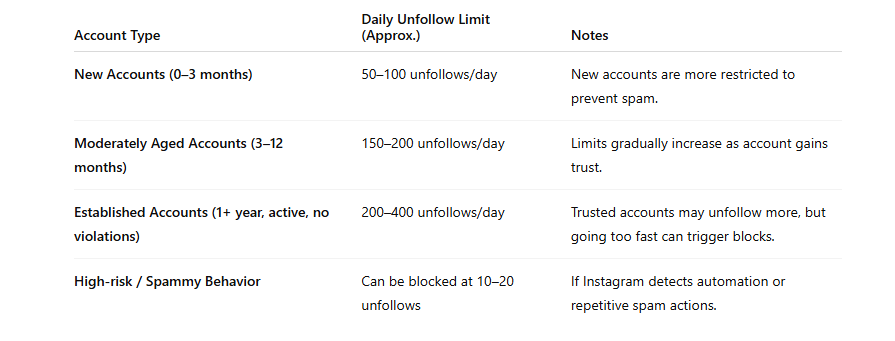
Instagram sees follows and unfollows as pretty much the same thing, so when you track your daily actions, it includes both. If you’ve been around for a while (like a few months or more), you can usually unfollow about 150 to 200 accounts each day, with a limit of around 60 unfollows per hour.
For newer accounts (under about 3 months), the rules are a bit tighter, aim for around 100 to 150 unfollows daily. Reddit users suggest that a steady pace of unfollowing 10 to 20 accounts each hour, or keeping it to about 150 total for the day, is a safer and more natural approach.
Be careful, though! If you go on a mass unfollowing spree too quickly, don’t set off Instagram’s anti-spam filters, which could lead to temporary blocks on your actions or even a shadow ban. The best strategy? Space out your actions, mix up the timing, and keep your total daily activities, including likes, follows, and comments, under Instagram’s overall limit (usually a few hundred) to avoid drawing attention.
Best Apps And Tools To Mass Unfollow (Safely)
Followers & Unfollowers (Android/iOS)
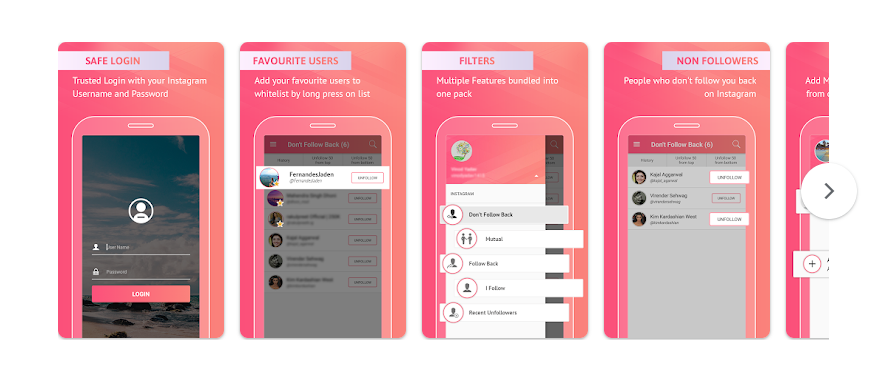
This app makes it super easy to unfollow users in bulk and organize your following list by those who aren’t following you back. It’s straightforward, free, and user-friendly and ideal for casual users. You can pick up to 50 users at once and unfollow them with just a tap. Plus, it shows inactive users, mutual followers, and ghost followers. While the free version does come with ads, the premium option removes them and unlocks additional features. It’s highly rated on both the Google Play Store and the App Store, so it’s a solid choice for beginners.
How to See Someone’s Likes on Instagram? (4 Methods)
Cleaner For Instagram (iOS)
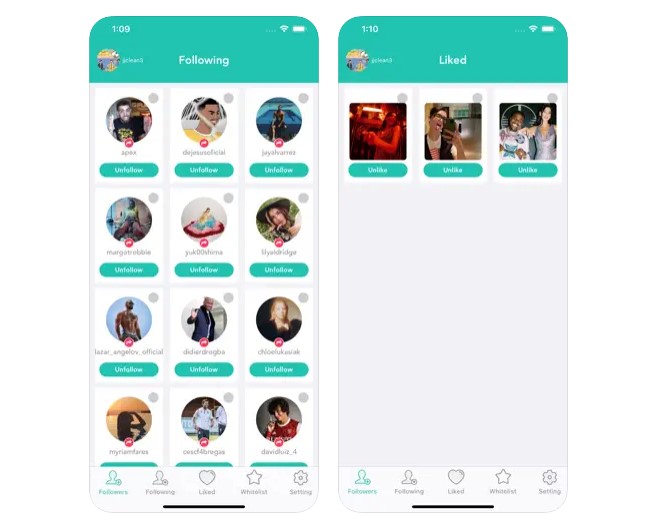
This is an awesome app designed for iPhone users that makes it super easy to unfollow, block, or delete multiple users all at once. You can sort through accounts based on various criteria, like those who aren’t following you back or accounts that have gone inactive. Plus, it features an “Auto Unfollow” option that can quietly run in the background at a slow pace, helping you steer clear of Instagram’s spam filters. While the free version has a cap on daily actions, the pro version allows you to handle hundreds of unfollows without any ads. This tool is sleek, speedy, and perfect for anyone seeking a more professional, straightforward experience.
AiGrow (Web Tool)

If you prefer not to download an app, AiGrow is a web-based Instagram management platform that offers a full suite of tools, including mass unfollowing. AiGrow’s Unfollow Tool is designed to be slow and human-like, which helps you stay under Instagram’s radar. It’s ideal for brands, influencers, or users who manage multiple accounts. You can schedule unfollow actions, set filters, and use smart targeting (like unfollowing only non-followers or users inactive for 30+ days). While AiGrow is a paid platform, it’s one of the most secure and reliable tools, especially if you’re serious about managing growth.
FollowMeter (Android/iOS)

FollowMeter is an awesome app for anyone looking to keep track of their unfollowing activity. It lets you see who has unfollowed you, who isn’t following you back, and highlights your top followers. While it doesn’t offer a one-tap bulk unfollow option, it presents your data in such a clear way that manually unfollowing becomes quick and purposeful. The user-friendly interface is perfect for beginners, and the insights it offers are incredibly valuable for long-term growth strategies. This app is a great choice for those who prefer a more deliberate approach to unfollowing.
How to See Who Viewed Your Instagram Post ?
Mass Unfollow For Instagram (Android)
This app is designed exclusively for Android, is all about one thing i.e. helping you unfollow multiple people at once. You can choose hundreds of accounts in a single go and let the app handle the rest. Just remember to keep it safe by limiting yourself to about 50–100 unfollows per hour to steer clear of any action blocks. It’s perfect for quickly tidying up your list of old or inactive accounts. The interface might be pretty basic, but it works well. Since it’s free, you’ll likely encounter a few ads unless you decide to upgrade to the premium version. It may not win any beauty contests, but it definitely gets the job done.
Unfollowers For Instagram – Non Followers & Fans (Android)

This app is a game-changer if you’re looking to tidy up your following list by unfollowing users who don’t follow you back. It organizes your followers into categories like “fans,” “non-followers,” “mutuals,” and more. From there, you can easily select the non-followers and unfollow them in batches. The design is super user-friendly, featuring large buttons and simple filtering options. Just a heads up—avoid using it for mass unfollowing in quick succession, as Instagram might take notice. It’s best to stick to a reasonable number of unfollows each day and mix up your timing a bit.
InstaClean – Cleaner For IG (iOS)

InstaClean is a fantastic choice for iPhone users looking to tidy up their Instagram. It allows you to unfollow, unlike, and even delete old posts in bulk, which is perfect if you’re planning a complete Instagram revamp. The app comes equipped with smart filters like “ghost followers” and “inactive accounts,” giving you plenty of manual control over what you want to clean up. Plus, it respects Instagram’s limits and will even alert you when you’re getting close to your action cap, helping you steer clear of any blocks. If you’re looking to manage your whole account—not just unfollow, this app is a powerful all-in-one solution.
What Is the Most Liked Instagram Post of All Time?
How Often Should You Clean Up Your Following List?
How often you decide to tidy up your Instagram following list really depends on how active you are. As a general guideline, doing it once a month is a smart idea. If you’re a content creator or running a brand, you might want to check in every 2 to 3 weeks to keep your account looking sharp and your engagement levels high. Over time, you might find yourself following accounts that no longer resonate with you, have gone inactive, or simply don’t follow you back.
Regular cleanups are a great way to keep your feed well-curated, improve your follower-to-following ratio, and eliminate any clutter. Plus, it helps Instagram’s algorithm get a better grasp of the content you want to see and interact with.
For those who use Instagram casually, a quarterly cleanup usually does the trick. If your explore page or feed feels a bit off, that’s a solid sign it’s time to trim down your following list. A clean feed equals a clean vibe!
Conclusion
Mass unfollowing on Instagram can transform your feed and enhance engagement but only if you approach it wisely. So, make sure to stick to Instagram’s daily limits, use safe and trustworthy tools, and steer clear of any bot-like behavior to keep your account secure.
 About Carson Derrow
