Social media has become an incredible tool. Be it marketing or personal branding, Instagram is one of the best social media platforms. Learning how to share a post on Instagram to your feed is essential for growing your social media presence.
Whether you want to share your own content or repost others’ Instagram posts to your feed, this comprehensive guide covers every method available in 2025.
Table of Contents
Why do you need to know “how to share a post on Instagram to my feed?”
Understanding how to share a post on Instagram to your feed helps you:
- Increase engagement by sharing relevant content consistently
- Build your brand presence through strategic content curation
- Save time by repurposing quality content legally
- Grow your follower base through cross-promotional opportunities
Unlike Facebook or Twitter, Instagram doesn’t offer a simple “share” button for feed posts. This guide reveals proven methods for sharing Instagram posts to your feed effectively.
How to share your own post on Instagram to your feed
Method 1: Creating original content for your feed

The most straightforward way to share a post on Instagram to my feed involves creating original content:
Step 1: Access Instagram’s Camera
Open Instagram and tap the plus (+) icon at the bottom center. This launches the content creation interface.
Step 2: Select Your Content
Choose photos or videos from your device gallery, or capture new content directly through Instagram’s camera.
Step 3: Apply Edits and Filters
Enhance your content with Instagram’s built-in editing tools. Adjust brightness, contrast, saturation, and apply filters that match your brand aesthetic.
Step 4: Write Your Caption
Craft engaging captions with relevant hashtags. Include location tags and mention other users to increase discoverability.
Step 5: Share to Your Feed
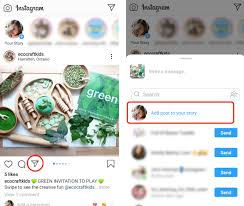
Tap “Share” to publish your post to your Instagram feed immediately.
FastDl: Download Instagram Videos and More
Method 2: Resharing your story content to your feed
You can share your Instagram Story content to your main feed:
- Create your Story content first
- Before the 24-hour expiration, save the Story to your device
- Upload the saved content as a new feed post
- Add fresh captions and hashtags for maximum engagement
How to share someone else’s post on Instagram to my feed
This is where most users struggle. Instagram intentionally limits direct sharing options, but several effective workarounds exist.
Method 1: Instagram downloader apps (most popular)
Instagram downloader apps provide the cleanest solution for how to share a post on Instagram to my feed:
Best Instagram Downloader Apps:
- IG Downloader (Android)
- InstaSave (iOS)
- StorySaver (Both platforms)
- iGram (Web-based)
Step-by-Step Process:
- Find the Instagram post you want to share on your feed
- Tap the three dots (…) in the post’s bottom corner
- Select “Copy Link” or “Share Link”
- Open your Instagram downloader app
- Paste the copied link
- Download the image or video to your device
- Open Instagram and upload the content as a new post
- Add proper attribution in your caption
Pro Tip: These apps preserve original image quality, unlike screenshot methods.
Imginn – Is It Safe To Use? (Instagram Video Downloader)
Method 2: Screenshot and crop technique
The screenshot method offers a quick solution for how to share a post on Instagram to my feed:
Process:
- Navigate to the desired Instagram post
- Take a screenshot while the post is visible
- Open Instagram’s camera feature
- Select the screenshot from your gallery
- Use Instagram’s crop tool to remove unwanted elements
- Add your caption with proper credit
- Share to your feed
Limitations: This method may reduce image quality and include Instagram’s interface elements.
Method 3: Dedicated repost apps
Specialized repost apps streamline sharing posts to your Instagram feed:
Popular Repost Apps:
- Repost for Instagram
- InstaRepost
- Regrann
Benefits:
- Automatically copies original captions
- Includes creator attribution
- Maintains original post formatting
- One-click sharing process
Drawbacks:
- Free versions often add watermarks
- May require multiple app switches
- Limited customization options
Gramhir: The Ultimate Instagram Viewer and Analyzer
Method 4: Web-based Instagram tools
Computer users can utilize web-based tools for sharing posts to their Instagram feed:
Recommended Tools:
- Iconosquare (Premium features)
- Later (Social media management)
- Buffer (Content scheduling)
Process:
- Access the web tool on your computer
- Search for the target Instagram user
- Locate and download the desired post
- Transfer the file to your mobile device via cloud storage
- Upload to Instagram using your phone
- Add appropriate captions and credits
Instagram story to feed sharing methods

Sometimes you want to share Instagram Stories to your main feed:
Sharing your own stories to your feed
- Create your Story content
- Before posting, save it to your device
- Post the Story as usual
- Later, upload the saved version to your main feed
- Modify captions for feed-appropriate content
Sharing others’ stories to your feed
This requires more careful consideration:
- Take a screenshot of the Story (with permission)
- Contact the original creator for permission
- Upload as a feed post with clear attribution
- Tag the original creator in both the caption and the image
10 Best Instagram Story Viewers in 2024 [Anonymous And Free]
Essential Instagram sharing etiquette
Understanding how to share a post on Instagram to my feed includes following proper etiquette:
Always credit original creators
Never share content without attribution. Use clear crediting formats:
- “#Repost @username”
- “Originally posted by @username”
- “Credit: @username”
- “Shared from @username”
Request permission first
Contact original creators before sharing their content. This approach:
- Shows respect for intellectual property
- Builds genuine networking relationships
- Prevents potential copyright issues
- Often leads to collaboration opportunities
Respect privacy settings
Never share content from private Instagram accounts. Users choose privacy settings deliberately, and violating this trust damages relationships.
Check bio restrictions
Many creators specify sharing preferences in their bios. Photographers, artists, and content creators may prohibit reposting entirely.
Advanced strategies for Instagram feed sharing
Content curation strategy
When learning how to share a post on Instagram to my feed, develop a strategic approach:
Follow the 80/20 Rule:
- 80% original content creation
- 20% curated/shared content
Quality over quantity!! Share only content that aligns with your brand values and audience interests.
Building relationships through sharing
Strategic sharing builds valuable connections:
- Engage meaningfully with posts before sharing
- Comment thoughtfully on original posts
- Tag creators in your shares
- Send direct messages thanking creators
- Offer reciprocal sharing opportunities
Tracking Performance
Monitor which shared posts perform best:
- Use Instagram Insights for engagement metrics
- Track follower growth after sharing campaigns
- Note which content types resonate most
- Adjust the sharing strategy based on data
Common mistakes when sharing posts to Instagram feed
Mistake 1: Ignoring copyright laws
Sharing without permission can result in:
- DMCA takedown notices
- Account restrictions
- Legal complications
- Damaged professional relationships
Mistake 2: Poor attribution practices
Vague or missing credits frustrate original creators and may violate platform policies.
Mistake 3: Over-relying on shared content
Excessive sharing makes profiles appear unoriginal and may hurt engagement rates.
Mistake 4: Low-quality sharing methods
Using poor-quality screenshots reflects badly on your brand. Invest in proper downloading tools.
Instagram feed sharing best practices
Optimize your sharing workflow
- Bookmark content for later sharing
- Batch process downloads and uploads
- Schedule posts for optimal engagement times
- Maintain content calendars, balancing original and shared content
Add value to shared content
Don’t simply repost content. Instead:
- Add your perspective or commentary
- Explain why you’re sharing
- Connect content to your audience’s interests
- Provide additional context or resources
Maintain brand consistency
Ensure shared content aligns with:
- Your brand voice and values
- Visual aesthetic standards
- Audience expectations
- Content quality standards
Dumpor: Best Instagram Story Viewer Anonymously in 2024
Technical tips for better instagram feed sharing
Image quality optimization
- Use Instagram downloader apps over screenshots
- Maintain original aspect ratios
- Ensure high-resolution downloads
- Check image quality before posting
Caption optimization
- Include relevant hashtags naturally
- Tag original creators prominently
- Write engaging, authentic captions
- Include call-to-action elements
Timing and frequency
- Share during peak audience activity
- Space out shared content appropriately
- Maintain consistent posting schedules
- Balance sharing with original content
Future of Instagram feed sharing
Instagram continuously updates its sharing features. Stay informed about:
- New built-in sharing options
- Policy changes affecting content sharing
- Emerging third-party tools
- Best practice updates
Conclusion
You now know exactly how to share a post on Instagram to my feed using proven methods. Pick your preferred technique – Instagram downloader apps work best for quality results. Always credit original creators and ask permission first.
Start implementing these strategies immediately. Download an Instagram sharing app, practice proper attribution, and begin curating valuable content for your audience. Balance shared posts with original content using the 80/20 rule.
Master these techniques, respect other creators, and watch your Instagram engagement improve. Your feed will transform from static to dynamic, building genuine connections that drive real growth.
 About Carson Derrow

