Ask a founder whether their website is outdated and they’ll look at the design. The signs that cost a startup deals sit somewhere else: in copy written for last year’s customer, in pages the site never got, and in the week it takes to publish a one-line change.
Design still matters. When Stanford researchers asked 2,684 people to judge the credibility of live websites, 46.1% said the site’s design or look shaped their view (Stanford Web Credibility Project, 2002). It’s one sign out of six.
Your startup website is the sales asset prospects check before every call and investors open before every meeting. Startups change fast, and their websites get patched one page at a time until they describe a company that no longer exists. These six signs tell you whether yours needs a refresh or a full rebuild. If it’s a rebuild, set the budget early: here’s what a website migration costs and what pushes the number up.

Table of Contents
1. The site describes the company you were a year ago
A pivot, a new market or a move upmarket changes who you sell to and how you describe the product. The homepage headline still speaks to your first customers, and the new messaging gets squeezed into sections built for the old one.
Quick test: ask your newest hire to explain what you sell using only the homepage. If they reach for the pitch deck, the site has fallen behind the business.
2. Every change needs a developer
Early websites get built fast, by a freelancer or a technical cofounder, on a setup only they understand. That works until marketing needs a campaign landing page, a pricing update or a new case study, and every request joins a developer’s queue.
Your marketing calendar moves at the speed of your slowest edit.
Quick test: count the open page requests and the days a simple text change takes to go live. If a one-line update takes more than a day, the setup is costing you campaigns.
3. It’s slow on a phone
Google’s data showed that 53% of mobile visits are abandoned when a page takes longer than three seconds to load (Think with Google, 2016 benchmark).
Startup sites slow down one addition at a time: a tracking script for each new tool, a chat widget, a video background, uncompressed screenshots from every launch.
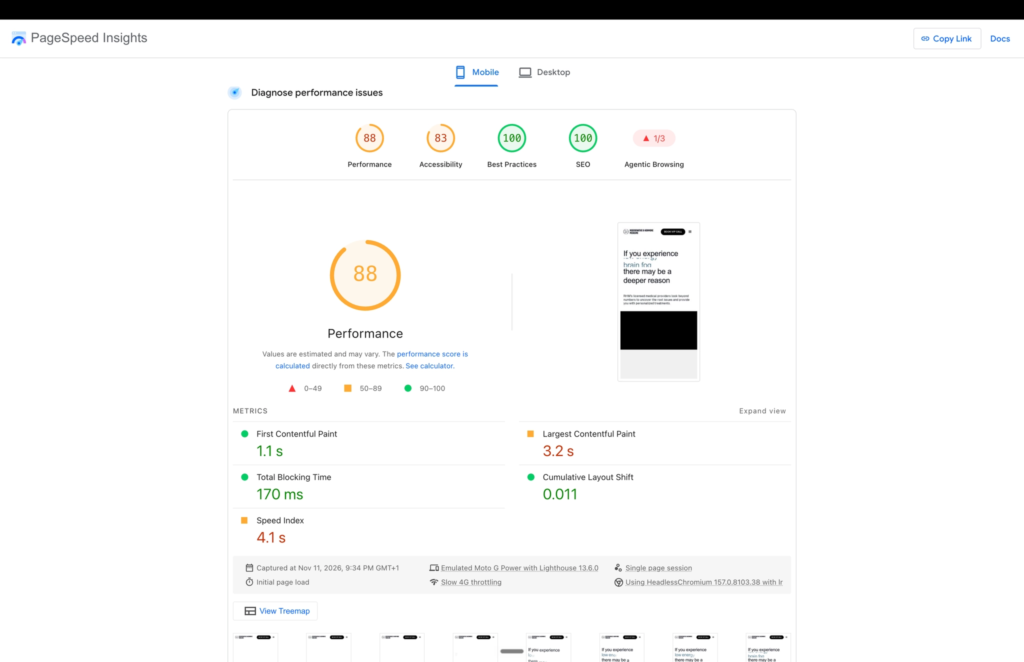
Quick test: run your homepage and your top two landing pages through Google PageSpeed Insights and read the mobile results. Heavy images and scripts are a refresh job. If the report points at the theme or page builder itself, plan a rebuild.
4. Sales sends PDFs because the pages don’t exist
Watch what your sales team attaches to follow-up emails. If reps keep sending the same security overview, integration list or use-case deck, buyers are asking questions your website doesn’t answer.
Every PDF your sales team sends twice is a page your website is missing.
Quick test: ask sales for the three documents they send most often. If none of them exist as pages, the site needs new sections, and new sections mean new navigation.
5. You can’t tell which pages bring in leads
Analytics installed years ago, forms that don’t pass a source, and a CRM full of leads marked “direct” all point to one problem: you can’t see what the website contributes. Without that data, you can’t decide what to keep in a redesign either.
You can’t protect what you never measured.
Quick test: pick five leads from last month and trace each one back to the page where it converted. If you can’t trace most of them, fix tracking first, so the current site gives you a baseline before anything changes.
6. The design looks older than the product
A startup website design ages in specific ways: product screenshots from three releases ago, fonts that change between pages, stock photos of handshakes, layouts that break on wide monitors. Prospects notice the gap the moment the demo shows a sharper product than the website promised.
Quick test: put your current product UI next to the screenshots on your marketing site. If they look like two different companies, prospects will see two different companies.
Website refresh or rebuild?
A website refresh keeps the structure and platform and updates the copy, the visuals and a few pages. A rebuild changes the structure, the platform or both.
| Sign | A refresh is enough when | Plan a rebuild when |
| Outdated messaging | The structure still fits and only copy and visuals changed | Your product, audience or pricing changed and you need new pages and navigation |
| Developer bottleneck | Edits are rare and small | Marketing ships pages every week and the current setup can’t keep up |
| Slow on mobile | Images and scripts cause it | The theme or platform causes it |
| Missing pages | You need one or two new pages | You need whole new sections, like use cases, integrations or resources |
| No lead tracking | Tracking can be added to the current site | The platform blocks the tools you need |
| Dated design | A new type and color pass on the existing templates works | The templates themselves limit what you can lay out |
The practical rule is simple: if the fix fits inside your current templates, refresh. If it needs new pages, a new structure or a new platform, rebuild.
Before you rebuild your website
A rebuild is also an easy moment to lose what your current site does well. We learned this on our own site: a rebrand, a platform rebuild and a domain move, stacked on an earlier traffic drop, left our search traffic under a third of its peak.
A sound website redesign strategy settles four things before any design work starts:
- A baseline. Export traffic, search rankings and conversions per page for the last three months, so you can compare after launch.
- Your URLs. Keep pages that rank at the same addresses where you can, and set up a 301 redirect for every URL that changes.
- Forms and integrations. List every form, where it sends data and which tools connect to it, then test each one on the new site before and after launch.
- A budget that matches the scope. Cost depends on how many pages move, how much content changes and which integrations come along, so price the full scope before design starts.
The website redesign process moves fastest when these four decisions come first. Move fast on the build and slow on the plan behind it.
Start before the next launch
An outdated website makes every other channel work harder. Sales explains what the homepage should, marketing waits on developers, and paid traffic lands on pages that don’t convert. If three or more of these signs sound familiar, start planning the rebuild now, before your next launch or fundraise, while you still have time to do it carefully.