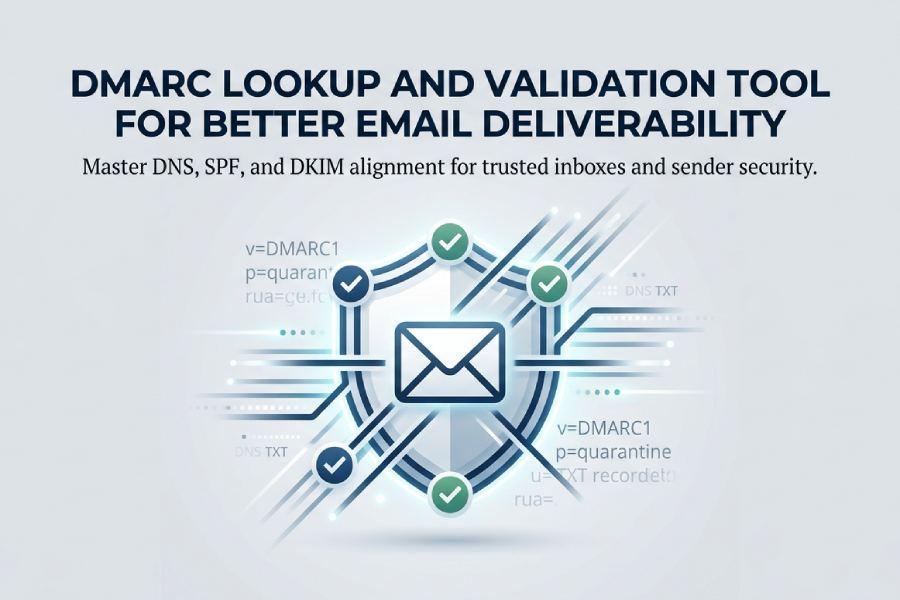
DMARC, short for Domain-based Message Authentication, Reporting, and Conformance, is an email authentication standard defined in RFC 7489. It builds on SPF, or Sender Policy Framework, and DKIM, or DomainKeys Identified Mail, to help receiving mail servers determine whether a message is legitimately authorized by the sending domain. A proper DMARC record gives mailbox providers clear instructions on how to handle messages that fail authentication.
For email deliverability, DMARC matters because ISPs, ESPs, Google, Yahoo, and enterprise gateways increasingly use domain authentication signals to decide whether messages should reach the inbox, spam folder, quarantine, or be rejected outright. A dmarc lookup helps confirm that a domain has a valid DMARC policy published in DNS and that the dmarc record is correctly structured.
DMARC protects the visible Header From domain, which is the domain users see in their inbox. This is important because attackers often abuse trusted brands by spoofing the Header From domain while using unrelated infrastructure in the Return-Path. With effective dmarc validation, organizations improve email security, domain security, phishing protection, spoofing protection, and brand protection.
Table of Contents
DMARC and Sender Authentication
DMARC requires alignment between the Header From domain and either SPF or DKIM. In practice, this means a message can pass DMARC if SPF alignment or DKIM alignment succeeds. A dmarc check verifies whether these authentication mechanisms are configured in a way that supports sender authentication.
A dmarc checker, dmarc record checker, or dmarc diagnostic tool can identify whether the domain name has a valid DNS TXT record beginning with *v=DMARC1*. Without this record, there is no DMARC policy for receivers to apply, which can weaken dmarc compliance and delay dmarc enforcement.
How a DMARC Lookup Tool Works: Checking DNS Records and Policies
A this dmarc lookup tool queries DNS for the DMARC TXT record at a specific location: _dmarc.example.com. For example, if the domain name is example.com, the tool performs a dmarc record lookup for _dmarc.example.com and checks whether a valid dns txt record exists.
Tools such as EasyDMARC, MxToolbox, dmarcian, and DNS platforms like Cloudflare can assist with dmarc record analysis, misconfiguration detection, and dmarc verification. A reliable dmarc diagnostic tool does more than confirm whether a dmarc record exists; it examines syntax, policy distribution, reporting destinations, alignment mode, and compatibility with SPF and DKIM.
DNS TXT Record Discovery
*v=DMARC1*
If the dmarc lookup finds multiple DMARC records, the configuration is invalid. DMARC requires only one dmarc record per domain. Multiple records can cause receivers to ignore the policy entirely, undermining dmarc compliance and preventing dmarc enforcement.
A dmarc check also evaluates whether required and optional dmarc tags are formatted correctly. These include the dmarc policy tag, reporting tags, and alignment settings. If any tag is malformed, a dmarc checker should flag it immediately.
Policy Interpretation
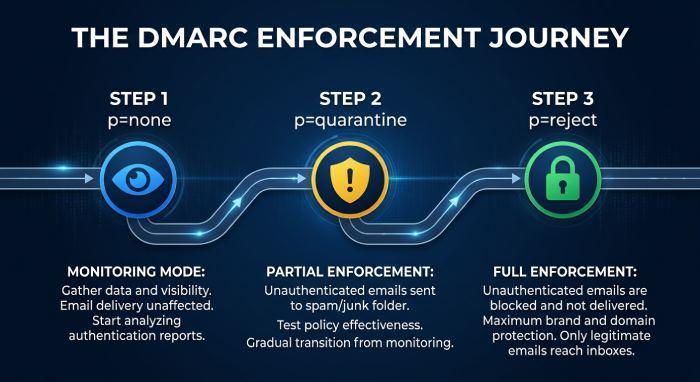
Once the dmarc record lookup retrieves the record, the tool interprets the policy mode. DMARC supports three primary policy values:
- *p=none* — monitoring mode, also called none policy
- *p=quarantine* — suspicious messages may be placed in spam or quarantine policy handling
- *p=reject* — failing messages should be rejected with reject policy handling
A strong dmarc validation process explains what each policy means and whether the current dmarc configuration is appropriate for the organization’s stage of dmarc implementation.
Key DMARC Record Elements to Validate: p, rua, ruf, pct, SPF, and DKIM Alignment
A complete dmarc check should validate the policy, reporting destinations, enforcement percentage, and alignment rules. The goal is to ensure the dmarc record is both syntactically correct and operationally useful.
Policy Tags: p, sp, and pct
The most important value in a dmarc record is the p tag, also known as the dmarc policy tag. It tells receivers how to treat mail that fails DMARC authentication.
Common examples include:
- *v=DMARC1*; *p=none*; *rua*=mailto:*dmarc*@example.com
- *v=DMARC1*; *p=quarantine*; pct=50; *rua*=mailto:*dmarc*@example.com
- *v=DMARC1*; *p=reject*; *rua*=mailto:*dmarc*@example.com
The *pct tag* controls the percentage of failing mail to which the policy applies. For example, pct=25 applies the policy to 25% of failing messages. This is useful during staged dmarc enforcement.
The sp tag defines subdomain policy. For example, a domain may use *p=reject* for the organizational domain while applying a different subdomain policy to marketing or transactional subdomains.
Reporting Tags: rua and ruf
The *rua* tag defines where aggregate reports should be sent. These dmarc reports are usually delivered in XML format and provide visibility into authentication results across ESPs, ISPs, and sending sources.
The *ruf* tag defines forensic reports, which may include more detailed failure information. Depending on the receiver, forensic reports may use formats such as AFRF or IODEF. However, many providers limit or do not send forensic reports for privacy reasons.
A dmarc report analyzer can process aggregate reports and help identify unauthorized senders, legitimate third-party vendors, SPF failures, DKIM failures, and suspicious traffic patterns. This makes dmarc validation more actionable than a simple DNS lookup.
SPF and DKIM Alignment
DMARC does not only ask whether SPF or DKIM passed. It asks whether the authenticated domain aligns with the Header From domain.
SPF Alignment
SPF alignment compares the domain authenticated by SPF, often associated with the Return-Path, against the Header From domain. The *aspf* tag controls SPF alignment mode:
- *aspf*=r for relaxed alignment
- *aspf*=s for strict alignment
A dmarc diagnostic tool should flag cases where SPF passes but fails dmarc alignment because the Return-Path belongs to an ESP rather than the sender’s domain.
DKIM Alignment
DKIM alignment compares the DKIM signing domain with the Header From domain. The *adkim* tag controls DKIM alignment mode:
- *adkim*=r for relaxed alignment
- *adkim*=s for strict alignment
Why Alignment Matters
A message can pass SPF and DKIM independently but still fail DMARC if neither authenticated domain aligns properly. That is why a dmarc record checker should evaluate SPF alignment, DKIM alignment, adkim, aspf, and the overall authentication chain.
Common DMARC Lookup Errors and How to Fix Them
A dmarc lookup often reveals configuration problems that directly affect deliverability and security. A good dmarc checker should provide clear remediation steps, not just error messages.
Missing or Invalid DMARC Record
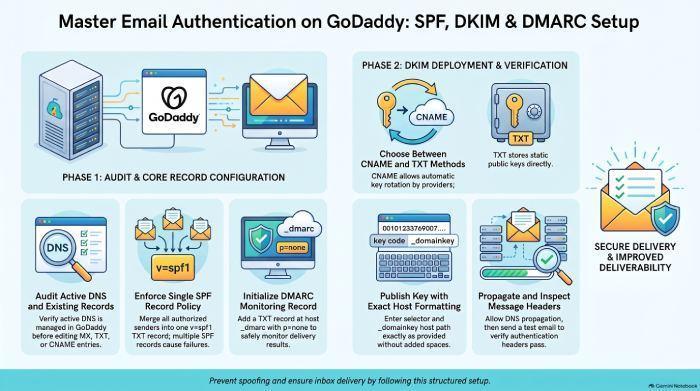
If a dmarc record lookup returns no result, publish a DNS TXT record at _dmarc.yourdomain.com. Start with a monitoring policy such as:
*v=DMARC1*; *p=none*; *rua*=mailto:*dmarc*@yourdomain.com
This none policy allows visibility before moving to dmarc enforcement.
Multiple DMARC Records
If the dmarc record checker finds more than one dmarc record, remove duplicates and consolidate the settings into a single valid DNS TXT record. Multiple records can cause dmarc validation to fail.
Incorrect Syntax or Unsupported Tags
Common syntax issues include missing semicolons, misspelled dmarc tags, invalid mailto values, or incorrect use of the *ri tag*. A dmarc diagnostic tool can detect these problems during a dmarc check.
Reporting Destination Problems
If *rua* or *ruf* points to an external domain, that destination may need authorization. Without proper authorization, aggregate reports or forensic reports may not be delivered. This limits visibility and weakens dmarc compliance.
Policy Too Aggressive Too Soon
Moving directly from *p=none* to *p=reject* can block legitimate mail if SPF, DKIM, or vendor authentication is incomplete. A safer approach is gradual dmarc implementation: begin with monitoring, review DMARC reports, move to *p=quarantine*, and then adopt *p=reject* when legitimate senders are aligned.
Best Practices for Using DMARC Validation to Improve Inbox Placement
DMARC is not only a security control; it is also a deliverability signal. Consistent dmarc validation helps mailbox providers trust your domain, especially when combined with healthy sending practices, clean lists, and reputable infrastructure.
Run a DMARC Check Regularly
Perform a dmarc check after DNS changes, ESP migrations, new vendor onboarding, and domain launches. A scheduled dmarc lookup can catch accidental changes before they impact inbox placement. Using a dmarc checker or dmarc record checker regularly supports ongoing dmarc compliance.
Use DMARC Reports for Visibility
Aggregate reports reveal which systems send mail for your domain and whether they pass SPF, DKIM, and DMARC. Feed XML data into a dmarc report analyzer to identify unauthorized senders, misaligned platforms, and sources that need remediation.
Move Gradually Toward DMARC Enforcement
A mature program progresses from *p=none* to *p=quarantine* and eventually to *p=reject*. This staged policy mode supports safe dmarc enforcement while reducing the risk of blocking legitimate business email.
Validate Every Sending Source
Before adopting a reject policy, verify that all ESPs, CRMs, marketing platforms, billing systems, and support tools are authenticated. Each sender should support SPF, DKIM, and dmarc alignment. This strengthens email authentication and improves domain security.


