
When Alfred 5 arrived in 2022, it brought a refined Workflow Editor, Workflow Prefabs, user configuration controls and a growing library of automation tools to macOS power users.
Four years later, we now have Alfred 6. And, while its interface remains unmistakably native, fast and uncluttered, it is all set to push your macOS productivity to completely new heights. Paired with deep refinements, Alfred 6 is a lightweight launcher but it packs a punch.
Table of Contents
From Alfred 5 to Alfred 6: What Changed and Why It Matters
“Comparison is the thief of joy,” but in this case, it is everything you need to know before taking the leap of faith.
If you read our previous piece on Alfred 5, you are likely aware that Alfred’s superpower has always been about speed and keyboard-first control. With Alfred 5, you had a sharper workflow canvas, with:
- Searchable patterns
- Prefabs
- User-friendly configuration sheets
- Automation tasks, etc.
These particular features streamlined automation, making it easier to assemble and share. Alfred 6 builds on that specific foundation, addressing two limitations in the earlier version:
1. Interface depth inside workflows
Traditional launcher workflows excel at quick text queries and action lists, yet some tasks benefit from structured inputs, side-by-side views, pickers, progress indicators, or standalone windows.
2. Everyday friction in recall and contacts
Hunting through past commands, finding people in crowded address books, or scanning recent clipboard clips should take seconds, not guesswork.
The most amazing thing about Alfred 6 is that it keeps its footprint tiny and native. There is no subscription trap, no bloated runtime and no forced cloud lock-in.
Alfred UI Toolkit: The Headline Feature
The most important point of discussion in the new Alfred 6 is the Alfred UI Toolkit. It is built from the ground up as a JSON-based, event-driven, native macOS UI system.
It provides the workflow creators the toolkit they need to craft responsive and lightweight interfaces inside Alfred without sacrificing performance.
How does it elevate workflows?
Before the introduction of Alfred UI, complex multi-step utilities often felt constrained, especially due to linear prompt and result loops.
With Alfred UI, creators can now combine different native macOS controls like editable text fields, buttons, structured data views, etc. Some of the leading features in the toolkit are:
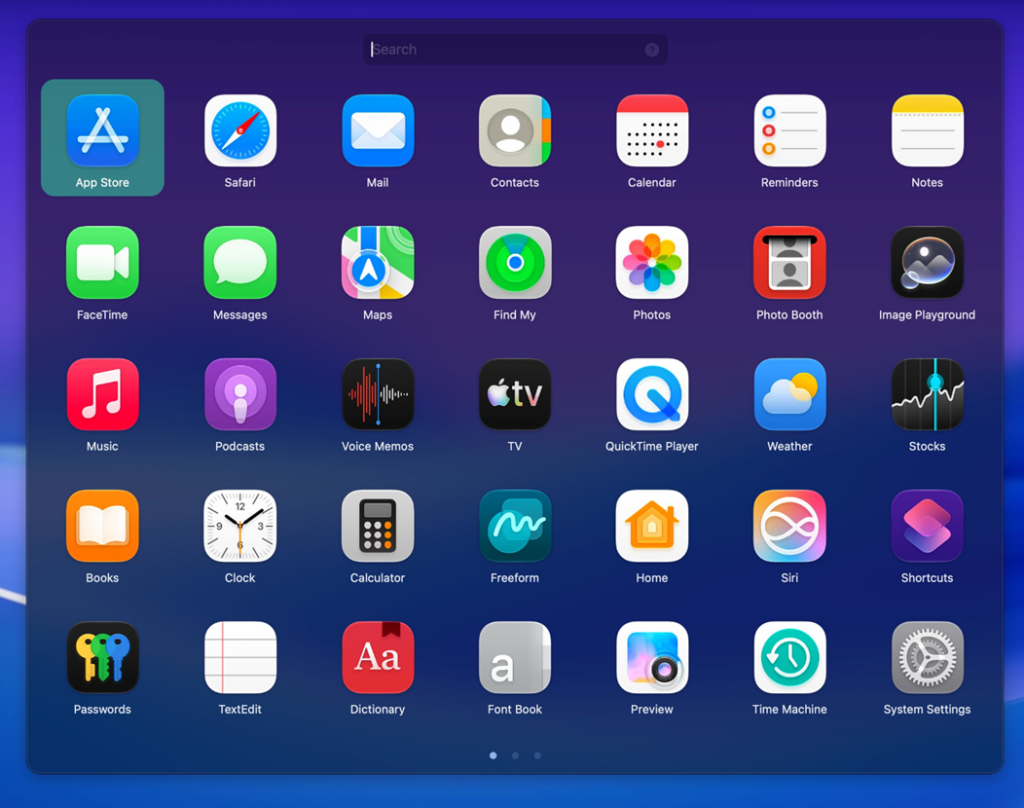
Launchpad: Enables you to search, arrange and launch applications with a visual workflow built using Alfred UI.
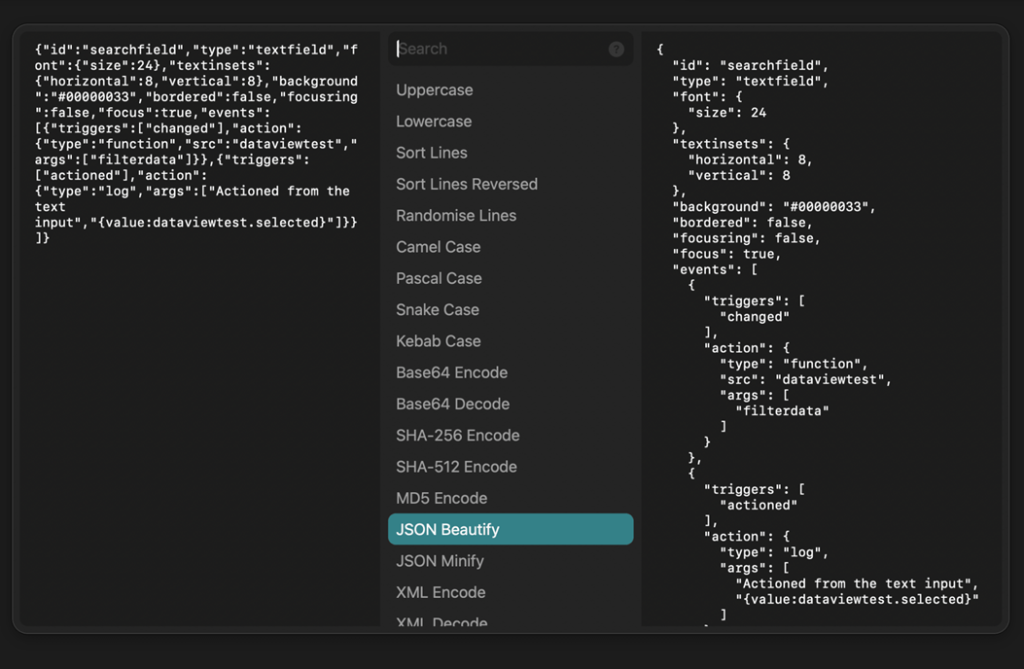
Text transformer: With this, the users can place source text on one side, inspect transformed output on the other and make chain adjustments and send the final result straight to the clipboard or active app.
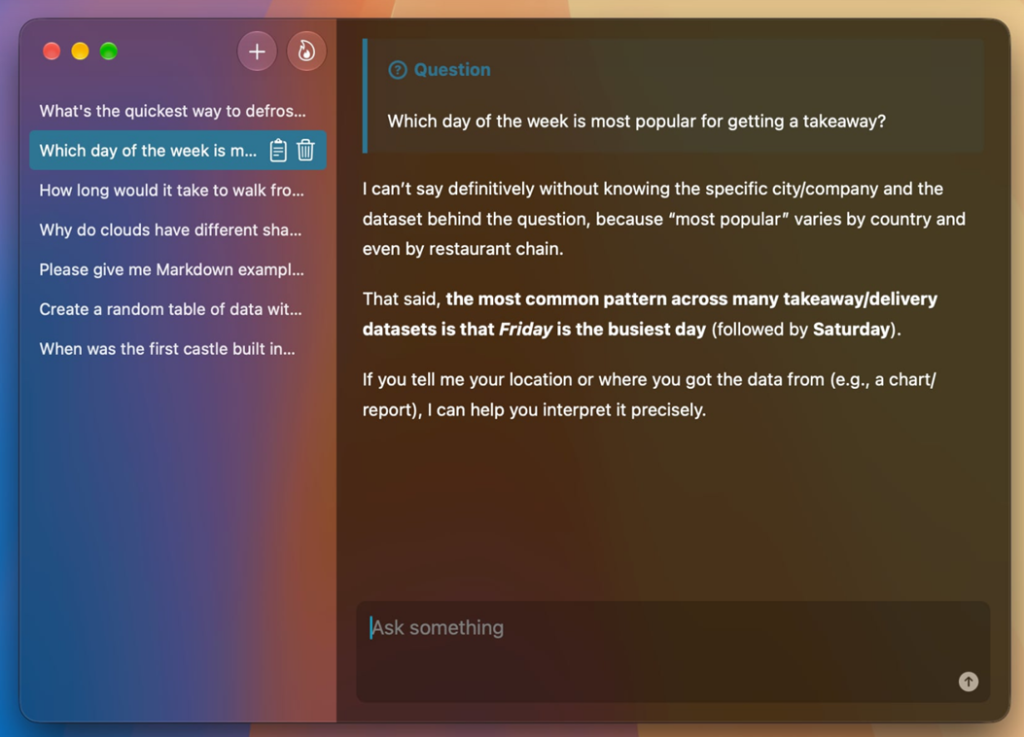
Brain outsourcing: This is one of the most ground breaking features. It keeps AI flexible and optional for the users. Instead of locking users into a single hosted assistance, it allows you to choose your preferred LLM and even bring your own API key.
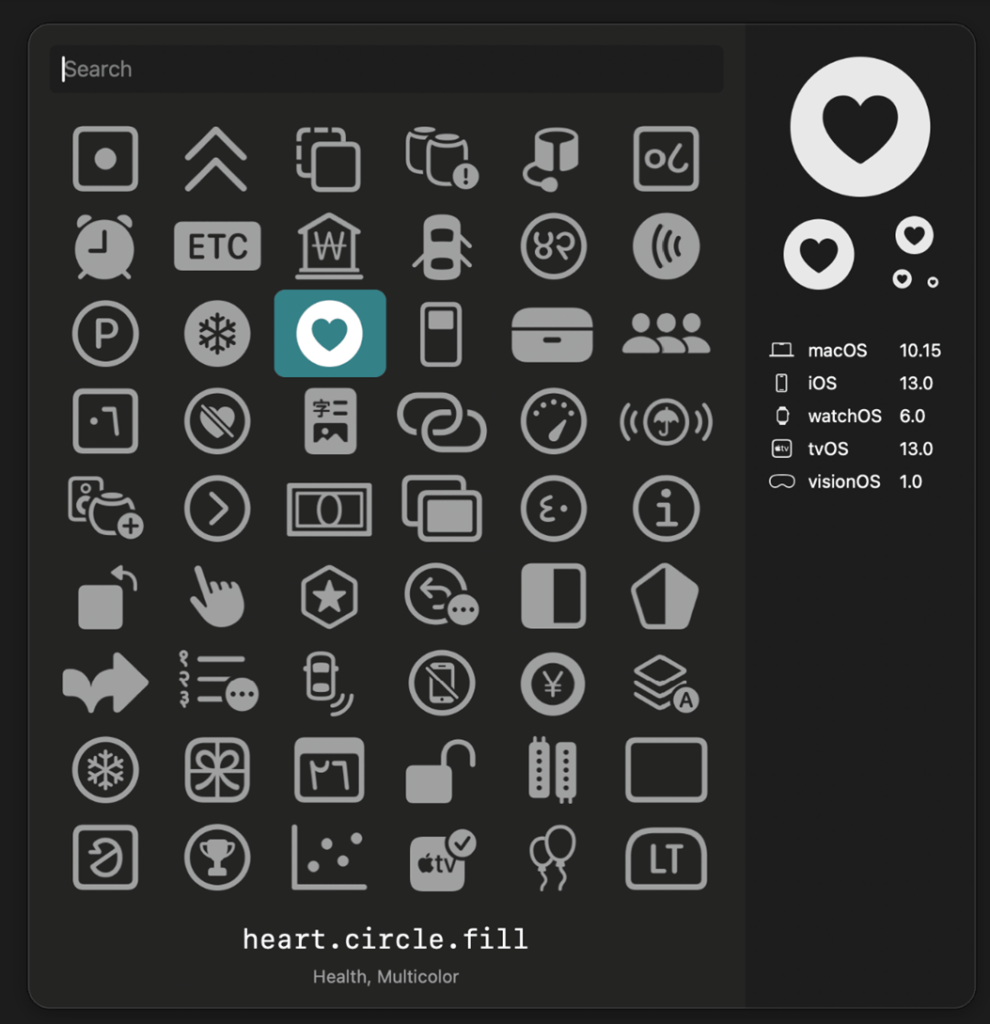
SF symbols browser: With access to a dedicated native interface, designers and developers can now choose their preferred SF symbols.
Community Momentum on the Alfred Gallery
With the Alfred ecosystem, one of the most important parts of it has been the community of makes. Our workflow creators, following the launch of Alfred UI, are already building custom tools. This includes timers, web testers, etc. If you are someone that prefers installing polished tools instead of building from scratch, the Alfred UI is quickly becoming a hub for richer and purpose-built utilities.
Speed on macOS 27 and Under-the-Hood Refinements
One of the leading needs in a productivity launcher lies in its responsiveness. So, when developing and launching Alfred 6, our priority was speed and stability.
The file search in macOS 27 is one of those features that runs remarkably fast and keeps the file retrieval process snappy, even if you are browsing through a large directory.
Under the surface, the following features of Alfred 6 are also worth noting:
1. Refreshed preferences for macOS 27
In Alfred 6, the preferences have been updated, both visually and structurally for macOS 27. It is further paired with full Light Mode support, including an insane Workflow Editor and expanded Accessibility support.
2. New built-in themes and fallback searches for everyone
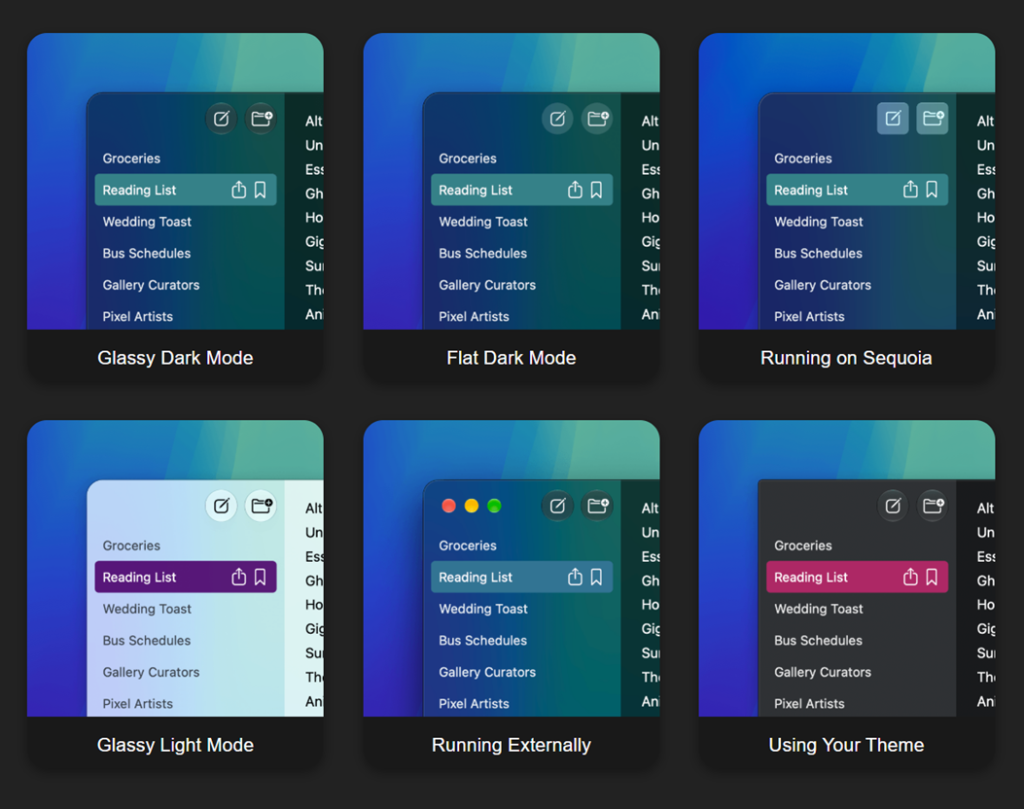
Free users now gain access to a host of new themes and the ability to customize fallback search results. This ensures that the launcher, at its core, is a lot more adaptable.
3. Refined markdown rendering
There is improved markdown parsing across Alfred, including support for Markdown tables. This will make the rich text output and documentation process a lot easier.
4. Searchable automation tasks
Alfred 6 has more than 230 Automation tasks integrated into the interface. The built-in search option makes it easier for users to find the exact building block.
5. Broad macOS compatibility
While tuned for macOS 27, Alfred 6 maintains support back to macOS 12+ so users on supported older systems aren’t left behind.
Everyday Quality-of-Life Upgrades
There is no doubt that Alfred UI grabs the spotlight. However, Alfred 6 brings along a host of other practical refinements that improve daily workflow.
Searchable, Persistent Query History
Alfred 6 expands query history with in-memory recall of up to 200 items, lets you search previous queries by typing !, followed by part of what you entered, and offers optional on-disk persistence with configurable retention periods ranging from 24 hours up to three months. If all that you remember is a keyword, searching for your query history is now a few taps away.
Rebuilt Contacts Search and Integration
Searching for contacts on Alfred 6 is now a lot easier and informative. Thanks to its optimized internal search engine and contact photos appearing directly in the search results, the process is a whole lot simpler. It also makes it easier for you to look up colleagues, clients or people with similar names.
Roomier Clipboard Viewer
If you are someone that relies a lot on clipboard history, there’s good news. Alfred 6 lets you view up to 30 recent items at once in the Clipboard Viewer. Also, with the new controls, you can adjust visible item counts and preview text sizes in both the Clipboard History and Snippets viewers.
Feature Comparison: Alfred 5 vs. Alfred 6
Coming around to the most important part, “What’s better in Alfred 6? Why should you invest and upgrade from Alfred 5?”
Well, here’s a side-by-side comparison:
| Area | Alfred 5 | Alfred 6 |
| Workflow Interfaces | Workflow Editor, Prefabs, User Configuration, and Automation Tasks | Adds Alfred UI Toolkit (JSON-based, event-driven native macOS UI inside or outside Alfred) |
| Query History | Up-arrow recall of recent queries | Searchable history via ! prefix, up to 200 in-memory items, optional disk storage (24 hrs to 3 months) |
| Contacts | Standard contact search and Powerpack viewer | Rebuilt fast internal search, contact photos in default results, plus new contact workflow objects |
| Clipboard Viewer | Compact list view of recent clipboard clips | Shows up to 30 items at once, with adjustable count/preview text size and better Messages copy support |
| macOS 27 & File Search | Pre-macOS 27 era optimizations | Tailored for macOS 27 with full Light Mode in Workflow Editor and fast file search |
| Free Tier Extras | Core launcher, web search, calculator, dictionary, system commands | Adds new built-in themes and customizable fallback searches for all users |
Licensing, Pricing, and Who Should Upgrade
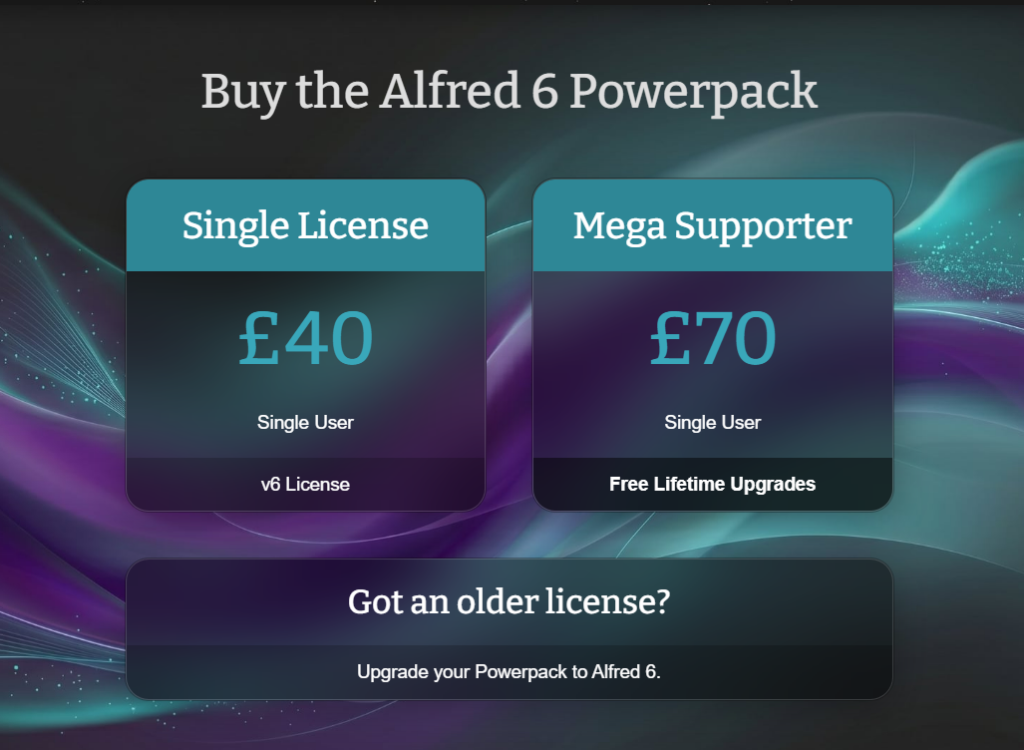
All of us are collectively tired of the recurring monthly subscription fees, right? This is one of the reasons why Alfred 6 is worth looking into. We offer straightforward licensing and the Powerpack options in Alfred 6 include:
- Free Version: Covers core launching, web search, calculator, dictionary, system commands, and now new built-in themes and customizable fallback searches.
- Alfred 6 Single License (£40): Single-user license for version 6.
- Mega Supporter License (£70): Single-user license that includes free lifetime upgrades.
If you are an existing Powerpack owner, there is a discounted upgrade pricing available. This is only applicable if you hold an earlier Powerpack license and want to move to Alfred 6.
Should you upgrade?
Now, the question of the hour. There’s no doubt that Alfred 6 offers some of the most amazing features needed in a productivity launcher. However, should you upgrade? Is it worth the money?
Consider the following pointers when thinking of upgrading:
- If you rely on Alfred for daily workflows, clipboard history or file search, upgrading to Alfred 6 is 100% justified. With upgraded features like Text Transformer and other upcoming community tools, it will be a worthy move.
- You should consider investing in a Mega Supporter pack if Alfred is a permanent fixture in your Mac. Instead of wanting to pay for every version upgrade, you can pay a one-time fee.
For the users that launch an app occasionally or don’t have much use of clipboard snippets or workflows, stick to the free version or don’t consider upgrading to Alfred 6.
Final Verdict
Alfred 6 does not try to reinvent what made Alfred great. Instead, it doubles down on it. The most important factor about the latest version is that it keeps the app lean, local and fast all while introducing advancements like the Alfred UI toolkit. You get to experience serious workflow power on your Mac without the weight of a bloated software. In short, Alfred 6 is a smart and dependable step forward.