Most sales teams still cut their territories in a spreadsheet, and the uneven results show it. The right mapping tool turns a list of accounts into balanced, drivable territories in an afternoon. The trouble is that the phrase “mapping tool” stretches from a free consumer app to enterprise software priced like a company car, and the right pick depends on how many accounts a team runs and how much of the work it wants automated. Price and capability swing hard from one tool to the next, so the right call comes down to how big the account list is and how much of the balancing a team wants the software to handle.
Table of Contents
Maptive
Maptive is built specifically for territory work, which sets it apart from general mapping apps that only drop pins on a screen. It imports thousands of accounts from a spreadsheet, geocodes the addresses, and lets a planner draw territories by region, postal code, or radius, then weigh them by account count or projected revenue until the workload across reps comes out even. As a territory map maker it covers the steps that break a spreadsheet, including bulk reassignment when a rep leaves, drive-time analysis for field routes, and instant recalculation when a region grows.
Past the basics, the useful parts stack up. Heat maps show where accounts and revenue concentrate, filters isolate a segment in seconds, and finished territories export to the formats a sales operations team already uses. A planner can test several structures against the same data and compare them on the numbers before committing one to the field, so the final choice rests on evidence.
The surest sign a team needs it is a spreadsheet that has stopped scaling, the kind where a planner reruns the entire map every quarter and dreads the week it eats. For that kind of work, the mix of balancing, routing, and an interface a non-specialist can drive is the reason it opens this list.
Google My Maps
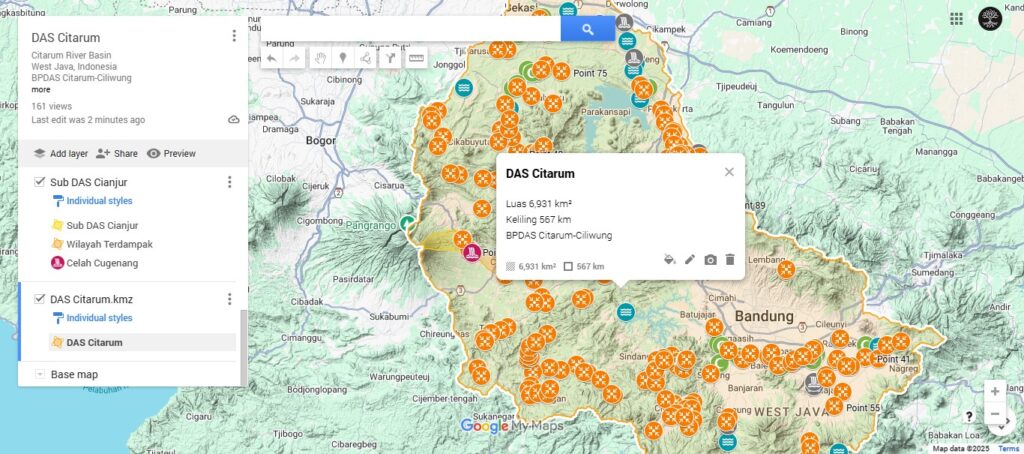
For a small team or a first experiment, Google My Maps costs nothing and plots a few hundred addresses on an interface most people already know. A user can drop pins, group them into layers, and share the result with a link. It is a fine way to see roughly where accounts sit before investing in anything heavier.
The ceiling is low, though. There is no balancing, no drive-time math, and a hard cap on how many points a map holds before it slows down. Past a few hundred accounts the manual work piles up fast, and the tool that felt free starts costing hours instead of dollars.
Microsoft Excel 3D Maps
Anyone with Microsoft Office already owns a basic mapping tool in Excel’s 3D Maps feature. It plots spreadsheet rows onto a globe, shades them by a column of values, and produces a quick visual of where the numbers land. For a one-time look at regional sales, it does the job without a new purchase.
It stops at visualization. Excel shows a pattern but cannot draw a territory, balance a workload, or reassign accounts, so it serves as a first glance and stops short of a planning tool. Most teams outgrow it the moment they try to act on what the picture shows.
Esri ArcGIS Business Analyst
ArcGIS is the heavyweight of the category, a full geographic information system with deep demographic and spending data layered in. For an organization that needs to model markets at a granular level and has analysts who know GIS, nothing matches its depth. Even so, the most powerful platform still produces a tidy map of wrong conclusions from bad inputs, so the data work comes first.
The cost is complexity and price. The learning curve is steep, the licensing is enterprise-grade, and most sales teams use a fraction of what it offers. Organizations with the staff to run it get enormous depth, while those without one watch most of that power go unused.
eSpatial
eSpatial sits in the territory-and-routing space alongside Maptive, aimed at sales and field teams that want balancing and route planning without a GIS background. It handles bulk uploads, territory alignment, and optimized routes, and its routing matters because field reps lose real selling hours stuck in traffic on poorly planned days.
It is a credible option for mid-market teams. The interface and pricing differ from the alternatives in ways worth a trial, and the right choice between similar tools usually comes down to which one a team will actually open every day.
Matching the Tool to the Team
The right choice tracks the size of the job more than the length of the feature list. A team with a few hundred accounts and no analyst is well served by a focused territory tool or even a free app, while a national force modeling demographics needs the depth of a full GIS and the staff to run it. Buying above the need wastes money on features no one opens, and buying below it pushes the manual work back onto the planner.
The deciding test is volume and automation. A tool has to balance the number of accounts the team actually holds and redraw territories without a full rebuild every time a rep moves on. Everything past those two capabilities is preference, and preference is best settled with a free trial on the team’s own data rather than a polished sales demo. A tool that looks impressive in a walkthrough can still frustrate the rep who has to open it every Monday, and that daily friction is what decides if a rollout sticks.
The Payoff of Better Territories
The reason to bother with any of these is money left on the table by bad territories. Lopsided patches drive good reps out, and voluntary turnover costs businesses between 50% and 200% of a departed seller’s salary once recruiting and onboarding are counted.
Fairness is the quieter return. A rep who sees a colleague handed an easier patch feels it, and feeling disrespected at work is one of the top reasons people leave a job. A tool that produces visibly balanced territories removes that grievance before it turns into a resignation. The cheapest mistake on this list is choosing none of them and cutting the lines by hand for another year, a choice that slowly costs a company both revenue and the reps who tire of an unfair patch.


